Agent On Camera: Why Tampa Realtors Should Be on Video
Articles
7 Min Read
Agent-on-camera video lets Tampa Realtors build familiarity before the first call. Formats, what to say, and the $100 on-camera add-on from Gator Gaze Media.
More Articles




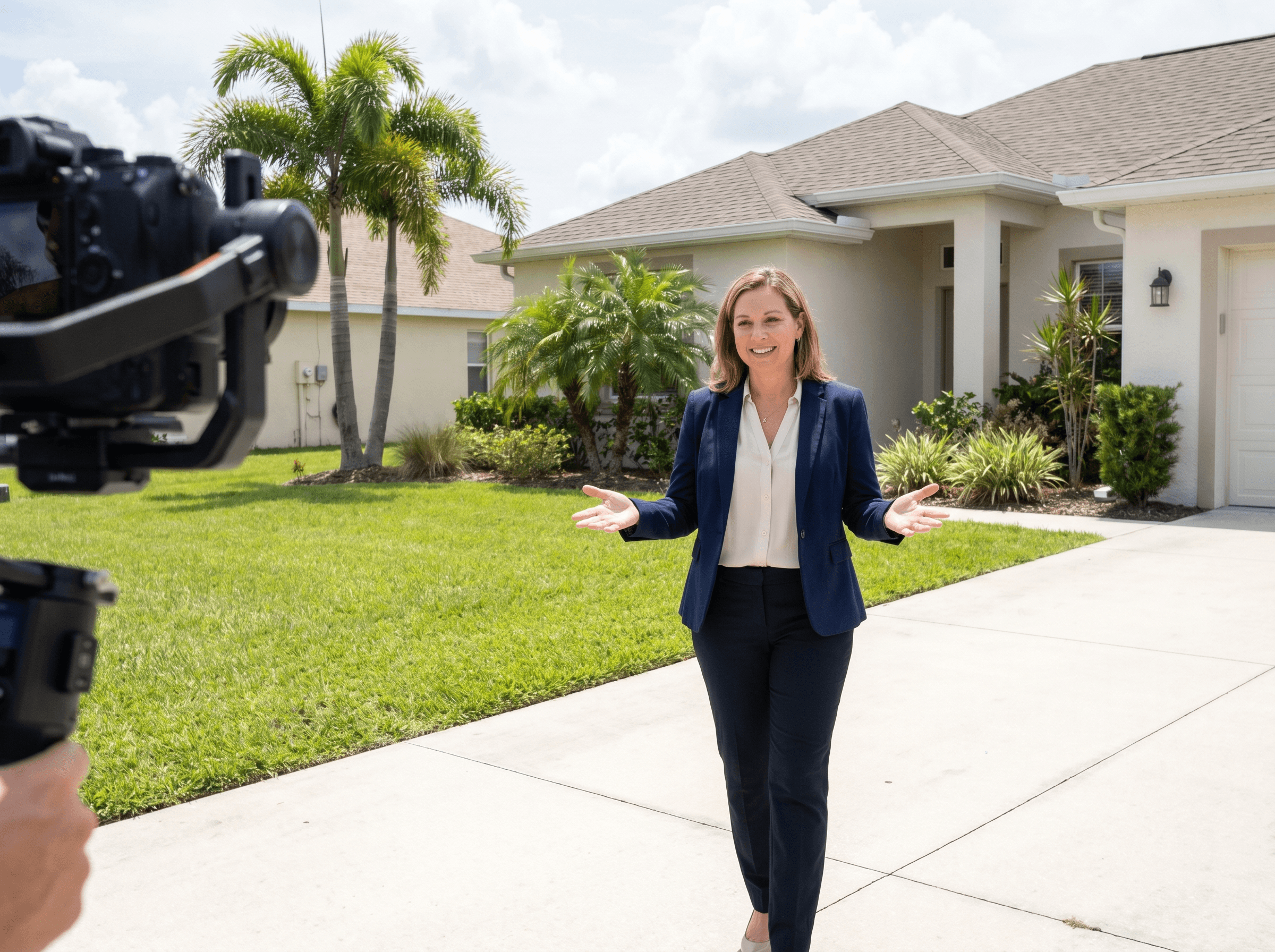
Agent-on-camera video puts you in front of buyers and sellers before the first phone call, so they already know how you talk and what you know about Tampa Bay. At Gator Gaze Media an agent-on-camera segment is a $100 add-on to your shoot, filmed during the same visit.
Why On-Camera Video Works
Think about how someone picks an agent. They search Google, scroll Instagram and ask friends, and they form an impression before they call. If your presence is a headshot and a bio, that impression is thin. If they have watched you walk a property, explain a neighborhood or describe how you work, they feel they know you a little.
We don't have a statistic to quote for how much video helps an agent win business, and we'd rather not invent one. The reasoning is simple: people hire someone they feel comfortable with, and video is a fast way to show who you are.
Types of Agent On-Camera Content
Listing walkthrough with narration
You walk through the listing on camera and explain what makes it special. Buyers see your knowledge of the area, not just the house. It suits luxury listings and busy neighborhoods where you need to stand out.
Market update videos
Short videos where you talk to the camera about rates, inventory, neighborhood trends and what buyers should know right now. Posting one every couple of weeks makes you the person people think of for local market information.
Neighborhood spotlights
You on camera in a Tampa neighborhood, such as South Tampa, Seminole Heights, Wesley Chapel or St. Petersburg, talking about schools, restaurants, walkability and what living there is like. These can match the searches people make when researching a move, like "living in South Tampa."
Guided client testimonials
You introduce the client, they describe their experience, and you close with a call to action. It is more credible than a written review and works on any platform.
Personal brand introduction
One well-made video that covers who you are, how you work and why someone should hire you. It can live on your website, Google Business Profile, Zillow agent page and email signature.
What to Say On Camera
Not knowing what to say is the most common hesitation, so use a simple structure:
Open with a hook. One sentence on why this matters to the viewer. For example: "If you're thinking about buying in South Tampa in the next six months, here is what you need to know."
Deliver the value. The market insight, neighborhood detail or property walkthrough. Keep it local and specific. Generic advice is everywhere, and what you know about Tampa Bay is what makes you worth watching.
Close with one call to action. "Call me at [number]," "Send me a DM," or "Book a consultation at [link]." Pick one.
Keep it short. Under two minutes is plenty for social posts. Longer formats like market updates or neighborhood tours can run a few minutes on YouTube.
What Makes Agent Video Look Professional
Lighting. Good light does the most for video quality. Face a window outdoors or indoors, not away from it. For indoor shoots, LED lighting avoids a flat, dim look.
Stable footage. Use a tripod or gimbal. Shaky handheld footage reads as low effort.
A clean background. Choose something uncluttered and relevant, like a well-staged listing or an outdoor setting with the skyline. Avoid busy bookshelves, messy kitchens and parked cars.
Clear audio. Viewers forgive soft video quality more readily than poor sound. A simple lapel mic makes a big difference.
Tight editing. Cut the pauses, the "ums" and the dead air.
Agent On Camera with Gator Gaze Media
We bring the equipment, handle lighting and framing, and capture footage you can use on your website, social media, YouTube, email and listing presentations. The agent-on-camera add-on is $100 and can be added to a listing shoot, so we capture the property and your narration during one visit. See our videography service page and pricing page, or read how our walkthrough and cinematic videos differ.
Questions We Get About Agent Video
Do I need experience on camera?
No. Most agents are nervous at first and settle in quickly. We help with framing, suggest a simple structure for what to say, and handle the technical side so you can focus on your delivery.
How much does it cost?
The agent-on-camera add-on is $100. It is added to a listing shoot, and the shoot itself is priced by package. You can see package prices on the pricing page.
What do I do with the videos?
Post them on Instagram Reels, Facebook, YouTube, TikTok, your website, your Google Business Profile and your Zillow agent page. Each platform reaches a different audience.
How often should I post?
Consistency beats volume. One good video a week, or biweekly market updates plus a monthly neighborhood or listing video, is a realistic baseline. To get started, contact us.




Similar Topic